
tax refund

Introduction

Filing your income tax return (ITR) is just the first step—what most taxpayers eagerly await is their refund. Whether you’ve overpaid taxes during the year or claimed deductions that reduced your tax liability, the Income Tax Department of India may owe you money. But how do you know if your refund has been processed? And more importantly, how can you check your income tax refund status in India, both with and without logging in to the Income Tax portal?

In this comprehensive, up-to-date guide (as of October 2025), we’ll walk you through every step to track your refund seamlessly, explain common refund statuses, and share tips to avoid delays. Whether you’re a salaried employee, a freelancer, or a business owner, this post will help you stay informed and in control of your tax refund journey.

Why Check Your Income Tax Refund Status?

Before diving into the “how,” let’s understand the “why.” Monitoring your refund status helps you:

  • Avoid unnecessary anxiety: Waiting for a refund can be stressful, but knowing its status brings peace of mind.
  • Identify processing delays: If there’s an issue (e.g., mismatched bank details), you can act quickly.
  • Plan your finances: A pending refund might affect your budgeting or investment decisions.
  • Ensure compliance: Sometimes, the department may send notices if discrepancies are found during processing.

Now, let’s explore the two main ways to check your refund status: with a login and without a login.

Method 1: Check Income Tax Refund Status Without Login

refund without login

Yes, you can check your refund status without creating an account or logging into the Income Tax e-Filing portal. This method is quick and ideal if you just need a snapshot of your refund’s current stage.

Steps to Check Tax Refund Status Without Login:

  1. Visit the official e-Filing portal: Go to https://www.incometax.gov.in
  2. Click on “Refund Status”: On the homepage, look for the “Quick Links” section (usually on the right-hand side or footer). Click on “Refund Status”.
  3. Enter required details:
    • PAN Number (Permanent Account Number)
    • Assessment Year (e.g., AY 2025–26 for ITR filed in FY 2024–25)
  4. Complete the CAPTCHA and click “Submit”.

Within seconds, you’ll see your refund status along with key details like:

  • Refund amount sanctioned
  • Mode of payment (ECS/NEFT or cheque)
  • Current processing stage

💡 Pro Tip: Ensure you select the correct Assessment Year. Confusing FY (Financial Year) with AY (Assessment Year) is a common mistake. For example, if you filed your ITR for income earned between April 2024–March 2025, your Assessment Year is 2025–26.
Method 2: Check Income Tax Refund Status With Login

refund with login

For a more detailed view—including past refund history, processing timelines, and any notices—you’ll need to log in to your e-Filing account.

Steps to Check Tax Refund Status With Login:

  1. Go to the e-Filing portal: https://www.incometax.gov.in.
  2. Log in using your:
    • PAN
    • Password
    • Date of Birth (or incorporation date for entities)
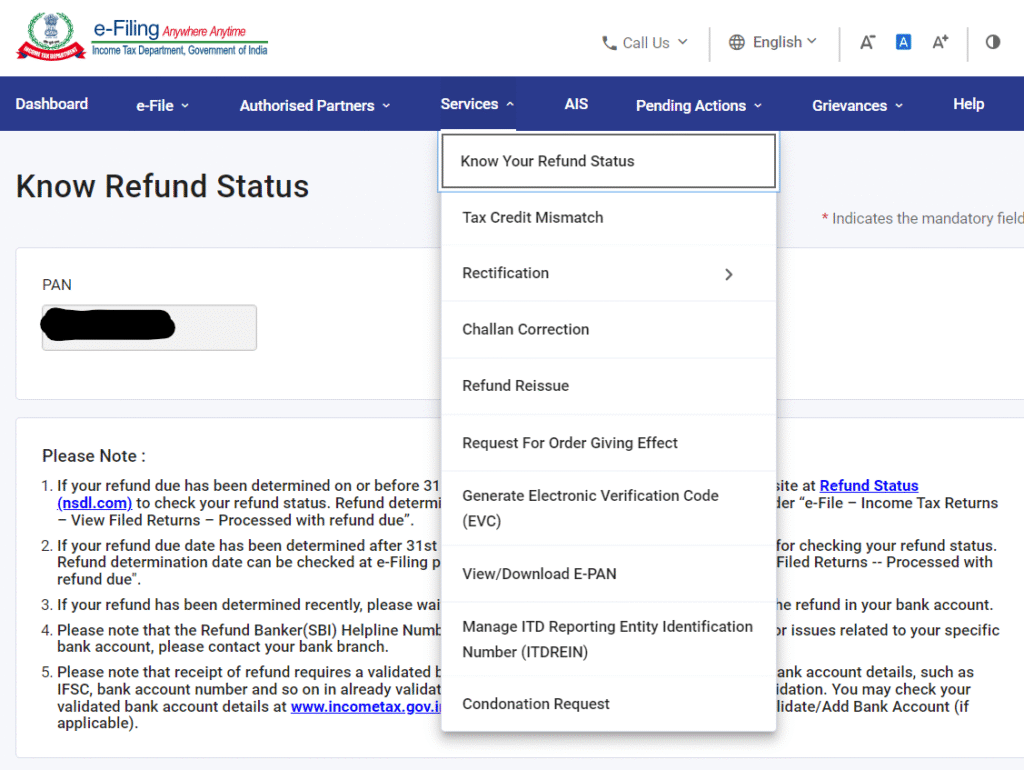
  3. Once logged in, navigate to “Services”“Know Your Refund Status” from the top menu.
  4. Select the relevant Assessment Year from the dropdown.
  5. Click “Submit”.

You’ll now see a detailed breakdown, including:

  • Status description (e.g., “Refund Paid,” “Refund Failed,” “Processing”)
  • Refund amount
  • Bank account credited (last four digits)
  • UTR (Unique Transaction Reference) number for NEFT refunds
  • Any demand raised (if applicable)

This method is beneficial if your refund failed due to incorrect bank details—you can update them directly from your dashboard under “Profile Settings” → “My Bank Account.”

Understanding Common Income Tax Refund Status Messages

The portal uses standardized status messages. Here’s what they mean:


Refund Paid
Your refund has been successfully credited to your bank account (via NEFT) or dispatched via cheque.
Refund Failed
The refund couldn’t be processed—usually due to incorrect or inactive bank account details. You’ll need to update your bank info and request a reissue.
Refund Adjusted Against Outstanding Demand
The department used your refund to offset a previous tax demand (e.g., from an earlier year). Check “Outstanding Tax Demand” under “My Account.”
Processing of Refund is in Progress
Your ITR has been verified, and the refund is being prepared. This typically takes 20–45 days after ITR verification.
No Demand No Refund
Your tax liability matched your payments exactly—no refund is due.
ITR-U (Updated Return) Under Processing
If you filed an updated return under Section 139(8A), the refund will be processed only after this is accepted.

Why Is My Income Tax Refund Delayed?

Even after filing and verifying your ITR, refunds can get stuck. Common reasons include:

  1. Unverified ITR: Your return isn’t processed until you e-verify it (via Aadhaar OTP, net banking, or EVC).
  2. Mismatched bank details: Ensure your bank account is pre-validated on the portal and linked to your PAN.
  3. Scrutiny or manual processing: High-value refunds or unusual claims may trigger manual review.
  4. Outstanding tax demands: Past dues can lead to automatic adjustment.
  5. Incorrect PAN or name: Must exactly match your bank records.

✅ Action Step: If your refund is delayed beyond 60 days of ITR verification, log in and check for any intimation under “e-Proceedings.” You can also raise a grievance via the “Grievance” section on the portal.

Tips to Ensure Faster Income Tax Refund Processing

  1. File Early: Submit your ITR before the July 31 deadline (or extended date).
  2. E-Verify Immediately: Don’t wait—verify within 30 days of filing.
  3. Pre-validate Bank Account: Go to Profile Settings → My Bank Account → Pre-validate. This links your account securely for NEFT refunds.
  4. Double-Check Details: Ensure PAN, name, and bank info are consistent across ITR, bank, and Aadhaar.
  5. Respond Promptly to Notices: If the department sends a notice (e.g., for mismatched TDS), reply within the stipulated time.

What If My Tax Refund Fails?

If you see “Refund Failed,” don’t panic. Here’s what to do:

  1. Log in to the e-Filing portal.
  2. Go to “My Account” → “My Bank Account.”
  3. Add or update your correct bank account and pre-validate it.
  4. Navigate to “My Account” → “Refund Reissue Request.”
  5. Select the assessment year and choose the validated bank account.
  6. Submit the request.

The department usually reprocesses the refund within 30–45 days.

Final Thoughts

Checking your income tax refund status in India is now easier than ever—whether you prefer the simplicity of a no-login check or the detailed insights from your e-Filing dashboard. By staying proactive, verifying your ITR promptly, and keeping your bank details updated, you can significantly reduce delays and ensure your refund reaches you without hiccups.

Remember: The Income Tax Department processes millions of returns each year. While most refunds are issued within 20–45 days of verification, patience and vigilance go a long way. Bookmark this guide, and refer back whenever you need clarity on your refund journey.

Explore our full suite of free online calculators.

Scroll to Top